Using the Chat Interface
Learn how to navigate and use Worqlo’s conversational chat interface effectively.
Interface Overview
The chat interface is your main workspace for interacting with Worqlo:
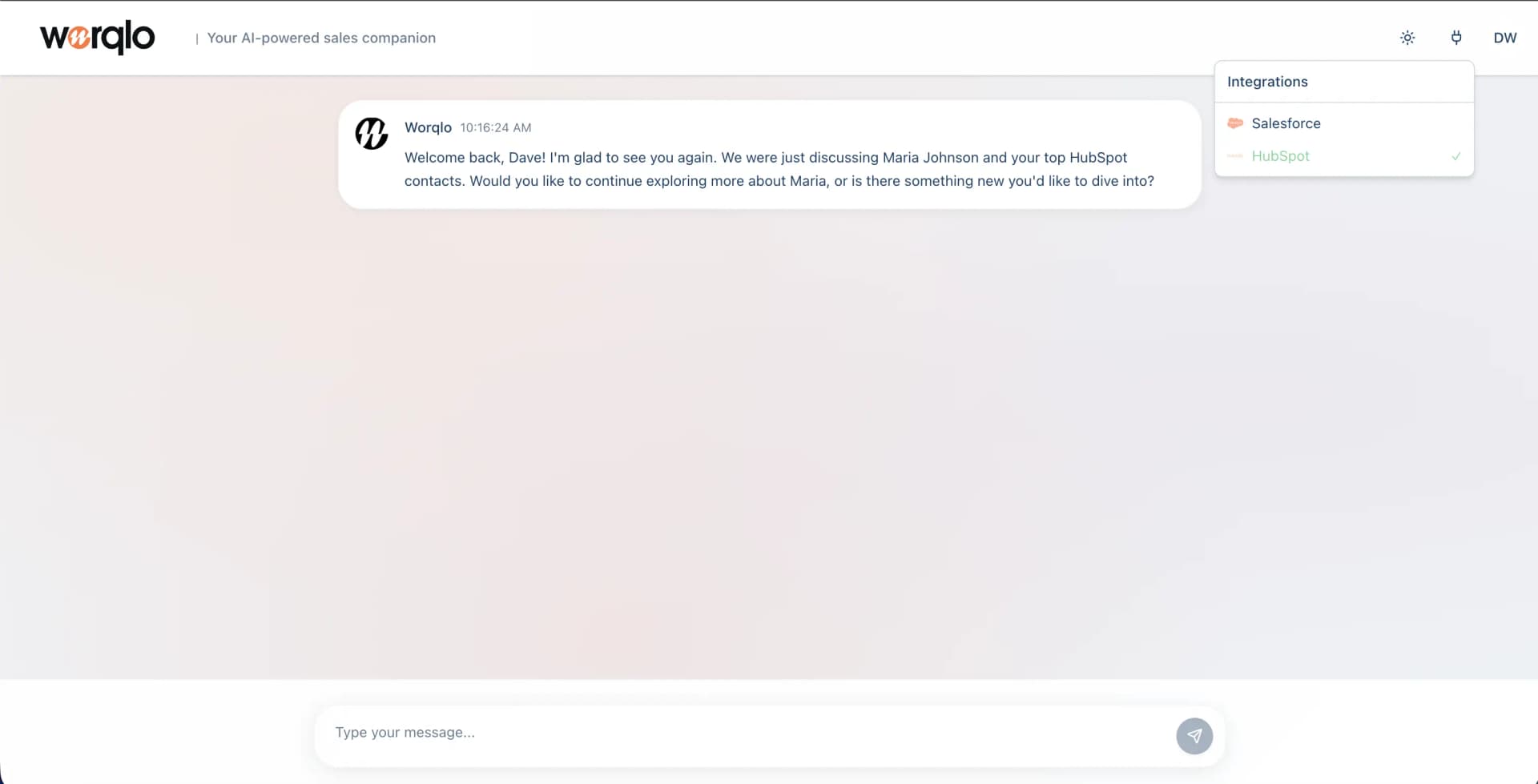
Header Elements
Top Left:
- Worqlo logo - Returns you to the main chat view
- Tagline - “Your AI-powered sales companion”
Top Right:
- Refresh icon - Refresh the chat or reload data
- Dollar sign icon - Access financial/currency features
- User initials - Your profile (e.g., “DW” for Dave Who)
- Integrations dropdown - View and manage connected data sources
Integrations Dropdown
Click the Integrations dropdown to see:
- Salesforce - Your CRM data source
- HubSpot - Your marketing/sales data source
- Other connected systems
A green checkmark indicates which integration is currently active or selected.
Chat Area
The main chat area displays:
Welcome Messages
When you first open or return to chat, Worqlo may greet you with:
- A welcome message
- Reference to previous conversations
- Suggestions for what to explore
Conversation History
- All your messages and Worqlo’s responses are saved
- Scroll up to view previous conversations
- Conversations are persistent across sessions
Message Format
Your Messages:
- Appear on the right side
- Show your input/questions
Worqlo’s Responses:
- Appear on the left side
- Include text, data, charts, or action confirmations
Input Field
At the bottom of the screen:
- Placeholder text - “Type your message…”
- Send button - Orange paper airplane icon
- Press Enter or click the send button to send your message
Starting a Conversation
- Click in the input field at the bottom
- Type your question or request
- Press Enter or click the send button
Example Questions
Pipeline Questions:
- “What’s our current pipeline?”
- “Show me deals over $50K”
Performance Questions:
- “What’s our win rate?”
- “Which rep has the most deals?”
Status Questions:
- “Show me deals at risk”
- “What’s the status of the Acme deal?”
Next Steps
- Asking Questions - Learn how to ask effective questions
- Taking Actions - Discover how to trigger actions
Last updated on